
Reject Convenience

"Convenience." It's a word that has become more important than ever. No matter what you want to do, it has to be convenient. It's the reason most websites are deliberately assembled based on how their users interact with it. It's the reason E-shopping suggests products related to what you've bought before. It's even the reason most people refuse to give up their Amazon Alexa's or their Google Home's. Convenience is the deciding factor in if we do something or not.
What does it mean to Reject Convenience?
Well, it means to turn your back to all of those great things. You could so easily use a website like Amazon to buy all of the products you use, or you could reject convenience and go shopping locally to support stores near you. That's the whole point of the channel, Reject Convenience. He goes out of his way to make incredibly high-quality videos about what he does to reject convenience. He also outs companies for what they do along with the convenience they provide.
One thing Reject Convenience provides is a website to all of his followers. On this website, he links his Privacy Visualizer that lets users easily mark what happens to their data. To show you how this looks, the rest of this blog will be how to use it.
Legend
For this example, I'm going to be using the method Reject Convenience uses on his Privacy Policies Explained channel. On this channel, he goes over many different privacy policies of well-known companies. They're enjoyable to listen to if you'd like.
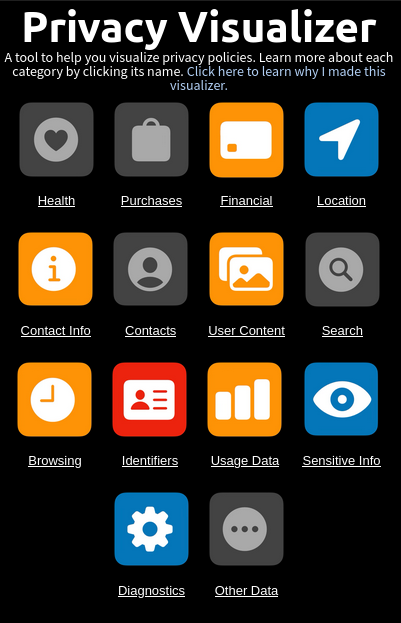
Gray - No data is collected
Blue - Data is collected, but not shared or sold
Orange/Yellow - Data is shared, but not sold
Red - Data is sold
How do I use the privacy visualizer?
Well, let's get started. We're going to use the company Workday, as they're highly used in the workforce and you will likely be required to use their services at some point in your life.
A good start is to look at the last time their privacy policy has been updated. In this case, it was last updated on February 27, 2026. This is important in case you've already read the privacy policy. In many cases, the companies refuse to notify you about changes and it's your duty to reread their policy every time it changes.
Next, you're going to want to start reading their privacy policy. The privacy visualizer provides a large amount of categories commonly listed on the Apple app store. These categories include:
- Health
- Purchases
- Financial
- Location
- Contact Info
- Contacts
- User Content
- Search
- Browsing
- Identifiers
- Usage Data
- Sensitive Info
- Diagnostics
- Other Data
I will get into these categories more as we go through the privacy policy.
Health
Reject Convenience describes this as, "health and medical data, which includes data from any user provided health or medical data... This includes things like your device’s accelerometers, gyroscopes, pedometer, magnetometer, and barometer. This can be collected for user interactions, fitness tracking, health-related matters, and more. For example, a game might use accelerometer and gyroscope input to control on screen game behavior, which technically falls under this health category as motion data."
Now that we know this, we're going to press ctrl + f to open the "find in page" bar and use some search terms provided to us by clicking on the category in the privacy visualizer. Unsurprisingly, I found nothing for health data. Because of this, I will be leaving Health as gray.
Purchases
This is commonly used to track your purchase history and what you frequently buy. It is normally then used to push products that relate the data.
In our example, this will stay as gray due to them not handling any purchase data.
Financial
This is any information related to payments. Say you are trying to buy something from Amazon. You have to input your card information to complete the purchase. That's what this collects. whether it's Amazon or other services such as Stripe or PayPal, this is the category it would go under.
The Workday Privacy Statement declares that "Workday may share personal information with third-party service providers or vendors contracted to provide services on our behalf (for example, IT and hosting, data analytics, event services, customer support, call recording, SMS texting, chatbot technology, data enrichment, email fulfillment, and payment services)." Because of this, the financial category will become orange/yellow
Location
Location data is anything relating to locating you. This could mean your IP address to geolocate you or providing them full permission to your precise location as required by Google Maps for example.
Workday clearly states that they collect your IP address and use it for a "broad geographic location from which you are accessing... [their] ...site." This means that location will be blue.
Contact Info
This is information to contact you. Typically, this is gathered when creating an account on services.
They state for nearly every category in their "Information collected automatically" section that your name, email address, and contact information is collected. This makes the contact info category blue.
But wait. Later on they also clearly define that they transfer your contact information to 3rd parties in cases where it is applicable. This makes the contact information category actually orange/yellow.
Contacts
Contacts is when you give permission to your contacts. This is explained in depth in my other article, First Contact.
In this case, they don't declare that they use this and so it will stay gray.
User Content
User content is anything that you share with the service. That means pictures, messages, and customer support.
Workday says in their Privacy Statement that they may transfer any content you provide to them for customer support to their 3rd party services. It also states that they may share call recordings and chatbot technology to their 3rd party services as well. This makes this category orange/yellow.
Search
These are searches made on the service you're using. It's likely that there is a search bar on the website or application that this is talking about.
In our case, Workday does not collect search data. This means the search category will stay gray.
Browsing
Browsing is 3rd party tracking tools. It's when it's not part of the application. This likely uses cookies, pixels, or other tracking methods.
Workday states that they "may enable third parties to use cookies and other trackers to show you ads on third-party websites that are more relevant to you." This means that the browsing category will be orange/yellow.
Identifiers
These are commonly ways to identify you. Think of if you make a username and import a profile picture, too. Those are ways of identifying a user. It's also using your advertising ID. As Reject Convenience says, "this type of data is very common, and weirdly enough, might not be considered directly identifiable on its own, despite its name."
Workday uses your advertising ID to share and sell your data to 3rd parties. For our example, they state that "under some data protection laws, our disclosure of this information to third parties through cookies and other trackers for targeted advertising may be considered a “sale” or “share” of personal information." Accordingly, the identifiers category will be red.
Usage Data
Usage data is data on how you interact with the application or website. It is frequently used by companies to understand what is good and bad about their services.
In this case, Workday says that they collect "Usage details, such as date and time stamps indicating when you use... [their] ...products, and details about which of... [their] ...products you are using." Because of this, the usage data category will be orange/yellow.
Sensitive Info
This is information on you that may be considered sensitive. This may include race, political information, sexual orientation, etc.
In our example, Workday, they state in their privacy policy that if you participate in research or surveys, they may collect "...company, job details, gender, age group, and other information relevant to the study." This means sensitive info will be blue.
Diagnostics
Diagnostic data is information on how their application or website works. It contains crash logs and launch time, among others.
Workday does tell their users in their Privacy Statement that they do collect diagnostics for "Troubleshooting and support: To diagnose and resolve technical issues." This makes it blue.
Other Data
This is any data that doesn't fit the other categories.
Workday does not collect any other data, so this category will be gray.
Conclusion
Here is our final privacy visualizer:
Man, that was a long post. I hope this was helpful in your privacy journey. If you found this helpful, go do this for other privacy policies! I know it's annoying to read them, but it's very important.
Please go support Reject Convenience, as he puts so much effort into his videos and refuses sponsorships to fund them. Find him on Youtube, Patreon, or Ko-Fi.